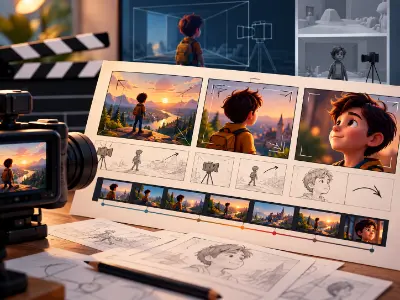
3D Animation Storyboard Project
Create a complete visual storyboard for a short 3D animation, covering story structure, scene planning, camera angles, framing, continuity, and presentation using PowerPoint.

From animated characters to eye-catching product visuals, 3D animation is shaping how brands, studios and digital creators tell stories. This Professional 3D Animation course helps students turn creative ideas into polished 3D visuals by learning modeling, texturing, lighting and animation. Through practical assignments, learners strengthen their technical abilities, create portfolio-worthy projects and prepare for entry-level roles, freelance work and opportunities across the evolving animation industry.


Making a story and understanding storyboard; building creative mindset with fundamentals of design and communication, structuring ideas visually using PowerPoint for impactful presentations and storytelling.
| CLASS | TOPIC | TYPE |
|---|---|---|
| Class 1 | Understanding CGI Industry Pipe Line Working Process | Theory |
| Class 2 | Story Building and Story Boarding | Recorded |
Mastering 3D Modeling, UV Mapping, and Rigging in Autodesk Maya.
| CLASS | TOPIC | TYPE |
|---|---|---|
| Class 1 | Software Installation | Recorded |
| Class 2 | Introduction to Maya | Lab |
| Class 3 | Polygonal Modeling Concepts | Lab |
| Class 4 | Subdivision & Edge Loop Theory | Lab |
| Class 5 | Vertex & Edge Operations | Lab |
| Class 6 | Bevel & Boolean Operations | Lab |
| Class 7 | Nonlinear Deformers & Material Basics | Online |
| Class 8 | Research, Reference & Hard Surface Modeling | Lab |
| Class 9 | Hard Surface Modeling | Recorded |
| Class 10 | UV Mapping Fundamentals | Lab |
| Class 11 | UV Snapshot & Texturing in Photoshop | Recorded |
| Class 12 | Advanced UV Mapping Techniques | Online |
| Class 13 | Key-shot: 01- Introduction | Recorded |
| Class 14 | Key-shot: 02 - Product Render | Recorded |
| Class 15 | Key-shot: 03 - Product Animation | Recorded |
| Class 16 | Introduction to Organic Modeling – Character Anatomy | Online |
| Class 17 | Body Modeling | Lab |
| Class 18 | Character Modeling (Female Body) | Recorded |
| Class 19 | Character Male Face Modeling | Theory |
| Class 20 | Character Female Face Modeling | Recorded |
| Class 21 | Character Props Modeling | Theory |
| Class 22 | Female Props Modeling | Recorded |
| Class 23 | Character Hair Modeling | Theory |
| Class 24 | Character Female Hair Modeling | Recorded |
| Class 25 | Character UV Mapping | Recorded |
| Class 26 | Rig:1 – Parent-Child relationship, Constrain relationship, Create Joints and Controller, Hand Rig | Lab |
| Class 27 | Rig:2 – Model prepare, Body rigging with Advanced Skeleton | Theory |
| Class 28 | Rig:3 – Face Rig with Advanced Skeleton | Theory |
| Class 29 | Rig:4 – Mechanical rig | Recorded |
| Class 30 | Exam | Lab |
Character Artist . Rig Artist . Texture Artist . Game Asset Artist
Mastering digital sculpting fundamentals and advanced modeling workflows in ZBrush.
| CLASS | TOPIC | TYPE |
|---|---|---|
| Class 1 | Software and plugin installation | Recorded |
| Class 2 | Introduction to ZBrush | Lab |
| Class 3 | High-Resolution Sculpting Techniques | Theory |
| Class 4 | High-Resolution Sculpting Techniques | Recorded |
| Class 5 | Z Brush Gaming Workflow | Theory |
| Class 6 | Game Asset Detailing | Recorded |
| Class 7 | Topology and zremesher | Recorded |
Character Artist . 3D Modeler . Digital Sculptor
Mastering texturing and material creation for 3D assets using Substance Painter.
| CLASS | TOPIC | TYPE |
|---|---|---|
| Class 1 | What is Texturing | Recorded |
| Class 2 | Software and plugin installation | Recorded |
| Class 3 | Introduction to Substance Painter | Lab |
| Class 4 | Advanced Material Creation in Substance Painter | Lab |
| Class 5 | Game Asset Texture | Online |
| Class 6 | Exporting Textures & Integration Workflow | Recorded |
| Class 7 | Character Texture | Lab |
Texture Artist . 3D Generalist
Mastering lighting and rendering for 3D assets using Vray.
| CLASS | TOPIC | TYPE |
|---|---|---|
| Class 1 | Understanding V-ray | Recorded |
| Class 2 | Vray Lighting | Lab |
| Class 3 | Exterior Lighting | Theory |
Lighting and Render Artist
Portfolio building and marketing.
| CLASS | TOPIC | TYPE |
|---|---|---|
| Class 1 | Online market place (Fiverr) | Online |
| Class 2 | Gig Opening | Online |
Freelancer
Mastering Character and Camera Animation.
| CLASS | TOPIC | TYPE |
|---|---|---|
| Class 1 | 12 principles of animation — Introduction of animation | Lab |
| Class 2 | Ball animation, Graph editor, Bouncing ball | Lab |
| Class 3 | Introduction to Substance Painter | Lab |
| Class 4 | Constrain Animation — Camera Animation | Lab |
| Class 5 | Walk Cycle Animation | Lab |
| Class 6 | Run Cycle Animation | Online |
| Class 7 | Product Animation | Lab |
| Class 8 | Action Animation using image sequence (Blocking) | Lab |
| Class 9 | Action Animation using image sequence (Spline) | Online |
| Class 10 | Time Editor — Bake Animation — Animation Render | Lab |
| Class 11 | Post Production | Lab |
Animator
Share your details and our team will reserve your seat in an upcoming free class of Professional 3D Animation.
Every project is portfolio-grade and presented with mockups, the way a client would receive it.
Create a complete visual storyboard for a short 3D animation, covering story structure, scene planning, camera angles, framing, continuity, and presentation using PowerPoint.
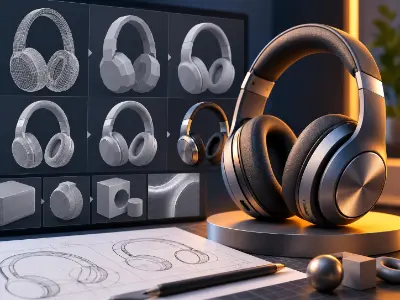
Create a clean hard-surface 3D product model in Autodesk Maya using polygonal modeling, subdivision, edge loops, bevel, and boolean operations.
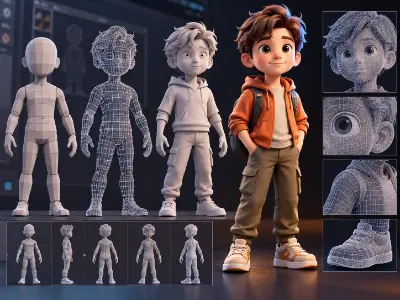
Build a basic 3D character body using polygonal modeling techniques, focusing on proportions, topology, and clean mesh flow.
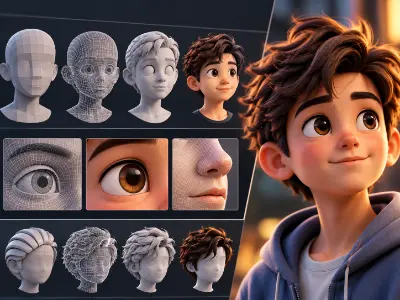
Model a character face and hair in Maya, creating recognizable facial forms and structured hair geometry.
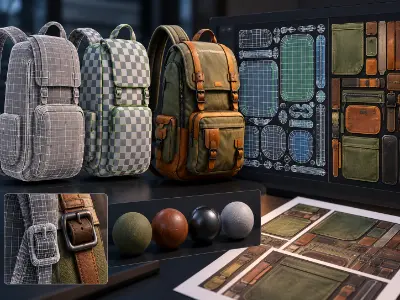
Create and organize UVs for a 3D asset, including UV mapping and UV snapshot preparation for texturing.
Prepare a character for animation by creating joints, controllers, parent-child relationships, constraints, and a basic body rig.
Create a complete game-ready 3D asset by combining modeling, UV mapping, texturing preparation, and asset presentation.
Create a high-resolution digital character sculpt in ZBrush using Dynamesh, sculpting brushes, clay buildup, smoothing, trimming, and detailing techniques.
Develop a detailed 3D gaming asset in ZBrush, focusing on high-resolution detailing and a practical game-asset workflow.
Create a detailed sculpt and prepare an optimized mesh using retopology and ZRemesher for a usable 3D asset.
Texture a 3D game asset in Adobe Substance Painter using material layers, smart materials, masks, generators, and baking techniques.
Create a character texture set and prepare the final textures for export and integration into Maya.
Create a professionally lit 3D scene using V-Ray three-point lighting, material setup, and photorealistic rendering principles.
Create an exterior 3D scene and produce a photorealistic render using V-Ray exterior lighting and rendering techniques.
Create a polished bouncing-ball animation using the 12 principles of animation, Graph Editor controls, timing, and spacing.
Create a character walk-cycle animation in Maya using a rigged character, animation principles, timing, and posing.
Create a short product animation in Maya using camera animation, object movement, timing, and animation principles.
Create a short action-based animation using image-sequence techniques, blocking, spline refinement, Time Editor, animation rendering, and post-production.
more practical projects across the course modules.
Free consultation & path planning
Enrol, orientation & kick-off
4 month, 51 classes begin
Theory, lab & AI workflows
27 client-grade builds
Viva, exam & course certificate
CV, interview & portfolio polish
Placement referral or freelance
This course prepares learners for diverse career opportunities in 3D animation and digital production. Students develop practical skills in modeling, texturing, character creation, animation, product visualization, and rigging, preparing them to pursue roles such as Game Asset Artist, 3D Product Visualizer, Character Animator, Texture Artist, Character Artist, and Rigging Artist.
"Lab support and mentor feedback were excellent. The portfolio I built here helped me get my first paid work."
"The Computer Networking with CCNA course was practical from day one. The mentors explained everything clearly and the projects helped me build real confidence."
"Lab support and mentor feedback were excellent. The portfolio I built here helped me get my first paid work."
"The Video Editing with Premiere Pro course was practical from day one. The mentors explained everything clearly and the projects helped me build real confidence."
"Lab support and mentor feedback were excellent. The portfolio I built here helped me get my first paid work."
"The 3D Modeling & Rendering with Blender course was practical from day one. The mentors explained everything clearly and the projects helped me build real confidence."
"Lab support and mentor feedback were excellent. The portfolio I built here helped me get my first paid work."
"The Digital Marketing Professional course was practical from day one. The mentors explained everything clearly and the projects helped me build real confidence."

To enroll at Creative IT Institute, choose your preferred course and enroll online or in person at your nearest campus. If needed, our counsellors can help you pick the course that suits you best.
Our counsellors will help you choose the right course based on your interests and career goals.
Our courses run online, offline and in a hybrid format that combines both, so students can learn in the way that suits them.
Yes, you get direct support and guidance from experienced mentors throughout the course.
Yes. Creative IT Institute is ISO 9001 certified and issues a course certificate after you complete your assessments and projects.
Master Interior and Exterior design through practical projects and industry-focused training.

Master 3D modeling, animation and visual storytelling through practical industry-focused training.
Master professional interior & exterior visualization
Share your details and our team will reserve your seat in an upcoming free class of Professional 3D Animation.
Fill in the form to reserve your seat in a free class.
Fill in the form to book your seat.
Fill in the form and an advisor will call you within one working day.
Fill in the form and an advisor will call you within one working day with the best discount available for this course.