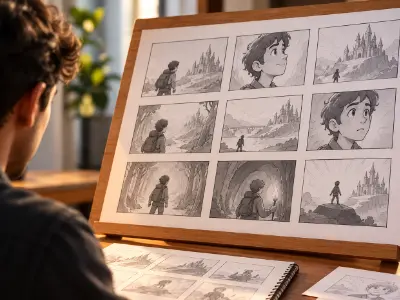
Storyboard Creation & Presentation
Create a complete storyboard from a story concept, focusing on visual storytelling, scene continuity, camera angles, framing, and clear presentation.

As demand for 3D animation grows across gaming, film, advertising and digital media, skilled artists are essential for creating realistic visuals and immersive experiences. This 8-month Mastery Program combines Professional and Advanced 3D Animation to meet industry needs. Students master core techniques, explore advanced concepts, gain practical experience, build a professional portfolio and prepare for careers, freelancing and creative opportunities in the global animation industry, with confidence and creativity for future success.


Making a story and understanding story board. Building your creative mindset with the fundamentals of design and communication. Learning to structure ideas visually using PowerPoint for impactful presentations and storytelling.
| CLASS | TOPIC | TYPE |
|---|---|---|
| Class 1 | Story building | Theory |
| Class 2 | Story Boarding | Theory |
3D Animator, Storyboard Artist, Creative Designer
Mastering 3D Modeling, UV Mapping, and Rigging in Autodesk Maya.
| CLASS | TOPIC | TYPE |
|---|---|---|
| Class 1 | Software Installation | Recorded |
| Class 2 | Introduction to Maya | Theory |
| Class 3 | Polygonal Modeling Concepts Understand polygon structure and object selection modes. | Online |
| Class 4 | Creating table And chairs | Lab |
| Class 5 | Subdivision & Edge Loop Theory Multi-cut tool, insert edge loop, edge ring, grouping objects. | Lab |
| Class 6 | Extrusion & Object Duplication Concepts Extrude, duplicate special, combine, separate, extract faces. | Recorded |
| Class 7 | Making House And Other assets | Lab |
| Class 8 | Vertex & Edge Operations Merge vertex, target weld, bridge, detach, chamfer. | Lab |
| Class 9 | Bevel & Boolean Operations Bevel, boolean (union, difference, intersection), alignment, topology control, creating holes and joints. | Lab |
| Class 10 | Nonlinear Deformers & Material Basics Bend, flare, sine, squash, twist, wave, symmetry, mirror, and smooth tools; assign new materials | Online |
| Class 11 | Making Pipes Using deformers | Lab |
| Class 12 | Product Modeling Video | Recorded |
| Class 13 | Research, Reference & Hard Surface Modeling Importance of research before modeling, using references, understanding hard-surface topology. | Lab |
| Class 14 | Hard Serface model | Theory |
| Class 15 | UV Mapping Fundamentals Understand what UV mapping is and why it’s essential. Learn projection methods for texture layout. | Lab |
| Class 16 | UV Snapshot & Texturing in Photoshop, UV snapshot export, basic texturing workflow using Photoshop, importing textures to Maya. | Theory |
| Class 17 | Advanced UV Mapping Techniques, Complex UV mapping, alignment, orientation, texel density, and layout optimization | Theory |
| Class 18 | Hard serface UV | Online |
| Class 19 | Introduction to Organic Modeling – Character Anatomy Understanding organic vs. hard-surface modeling, anatomy overview, hand modeling structure. | Lab |
| Class 20 | Character Male Body Modeling | Theory |
| Class 21 | Character Female Body Modeling | Recorded |
| Class 22 | Character Male Face Modeling | Theory |
| Class 23 | Female Props Modeling | Recorded |
| Class 24 | Character props Modeling | Theory |
| Class 25 | Character Hair Modeling and UV Mapping | Theory |
| Class 26 | Character Female hair Modeling Video | Recorded |
| Class 27 | Rig:1 Parent-Child relationship Constrain relationship Create Joints and Controller Hand Rig | Lab |
| Class 28 | Rig:2 Model prepare Body rigging with Advanced skeleton | Theory |
| Class 29 | Rig:3 Face Rig with Advanced Skeleton | Theory |
| Class 30 | Rig:4 Mechanical rig | Theory |
| Class 31 | Manual Rig | Recorded |
| Class 32 | Exam (Riging a character) | Lab |
Character Artist, Rig Artist, Texture Artist, Game Asset Artist
Mastering digital sculpting fundamentals and advanced modeling workflows in ZBrush.
| CLASS | TOPIC | TYPE |
|---|---|---|
| Class 1 | Software and plugin installation | Recorded |
| Class 2 | Introduction to ZBrush ZBrush interface, brushes, navigation, Dynamesh, and sculpting fundamentals. | Lab |
| Class 3 | High-Resolution Sculpting Techniques Detail sculpting workflow, clay buildup, move, trim, smooth, and crease brushes | Theory |
| Class 4 | Advanced Brush | Online |
| Class 5 | Brush Import | Recorded |
| Class 6 | Retopology & ZRemesher Theory Topology reduction, ZRemesher use, manual retopology workflow. | Theory |
| Class 7 | Game Asset Explain | Online |
| Class 8 | Detailing A game Asset | Theory |
| Class 9 | Creating Insert Mesh | Recorded |
Character Artist, 3D Modeler, Digital Sculptor
Mastering texturing and material creation for 3D assets using Substance Painter.
| CLASS | TOPIC | TYPE |
|---|---|---|
| Class 1 | Color Theory | Online |
| Class 2 | Software and plugin installation | Recorded |
| Class 3 | Introduction to Substance Painter Interface overview, material layers, smart materials, baking maps, and texture export settings. | Lab |
| Class 4 | Advanced Material Creation in Substance Painter Advanced mask painting, generators, anchor points, and custom material setup. | Theory |
| Class 5 | Character texture | Online |
| Class 6 | Exporting Textures & Integration Workflow Texture resolution, file formats, shader assignments, importing textures into Maya . | Theory |
| Class 7 | Game asset texture | Online |
Texture Artist, 3D Generalist
Mastering 3D Polygonal Modeling, Product Visualization, and Fluid/Smoke Simulation using Blender to create high-quality animated and still product renders.
| CLASS | TOPIC | TYPE |
|---|---|---|
| Class 1 | Introduction Of Blender, Opportunities, Screen Preview / Interface, Move/Rotate/Scale Tools, 2D/3D View port, Orthographic View, Camera Focus | Lab |
| Class 2 | Understanding custom Project Window, Polygonal Modeling, Components of a Polygon, Poly Count / Statistics, Get Back The Operator Box (F9), Duplicate, Axix and Gizmos, Shade Smooth or Flat | Lab |
| Class 3 | Subdivision, Knife, Loop Cut Tool | Theory |
| Class 4 | Extrude, Bevel, Combined, Extract Faces / Split | Lab |
| Class 5 | Marge Vertex, Taget Weld Tool, Auto Marge, Vertex Snap On, Bridge, Detach, Chamfer | Theory |
| Class 6 | Proportional Editing, Modifiers, Boolean, Solidify, Arrey, Subdivition Surface | Theory |
| Class 7 | Nonlinear, Latice, Work with Symmetry, Mirror Tool, Smooth/Subdivision surface, Reduce/Decimate, Shader editor, Texture connecting | Lab |
| Class 8 | Product 01: Switch GameCube Controller project | Theory |
| Class 9 | Product 02: Go pro camera project | Theory |
| Class 10 | Animation Basics, Graph editor, Camera Animation, Motion trail animation, Translate, Rotate, Scale Animation | Lab |
| Class 11 | Problem solving class | Online |
| Class 12 | Natural environment making, Vegetation plugin, Scattering with Geo node, Natural product visualization | Lab |
| Class 13 | Product modeling | Recorded |
| Class 14 | Indoor product visualization, Coffee machine animation | Lab |
| Class 15 | Product Lighiting, Light animation, Explode animation | Theory |
| Class 16 | Problem solving | Online |
| Class 17 | Introduction to Simulation, Fluid Simulation (Domain, Flow, Collider), Smoke Simulation, Water Simulation | Theory |
| Class 18 | Effector, Splash Simulator, Crown Splash simulator | Lab |
| Class 19 | Simulation | Recorded |
| Class 20 | Path along liquid simulator, Fluid simulation in Product visualization, Simulation Export Methods | Lab |
Product Visualization Artist, 3D Generalist, 3D Motion Designer
Mastering the 12 Principles of Animation by applying them to foundational exercises (Bouncing Ball, Walk/Run Cycles) using the Graph Editor and core animation tools in Autodesk Maya.
| CLASS | TOPIC | TYPE |
|---|---|---|
| Class 1 | 12 Principals of Animation: Squash & Stretch, Anticipation, Staging, Straight Ahead & Pose to Pose, Follow Through & Overlapping Action (Dragging), Slow Out & Slow In Spacing, Arc, Secondary Action, Timing, Exaggeration, Solid Drawing, Appeal | Lab |
| Class 2 | Animation Explain | Online |
| Class 3 | Animation Tools in MAYA, Animation Interface in MAYA, Graph Editor Introduction, 1st to 4th Principle of Animation, Timing, Slow Out & Slow In (Spacing), Arc, Squash & Stretch, Ball Animation, Bouncing Ball, Graph Editor (Auto, Spline, Linear, Break Tange | Lab |
| Class 4 | Constrain Animation | Recorded |
| Class 5 | Walk Cycle | Lab |
| Class 6 | Run Cycle | Lab |
| Class 7 | Image sequence | Online |
| Class 8 | Action animation | Lab |
| Class 9 | Time Editor And animation Export | Lab |
Entry-level 3D Character Animator in Game Development, VFX, or Animated Film/TV Production
Using Unreal Engine 5 as a real-time platform to create high-quality cinematic videos, focusing on environment design, realistic lighting, and integrating external animated assets via the Sequencer.
| CLASS | TOPIC | TYPE |
|---|---|---|
| Class 1 | Introduction & Project Setup: Getting Started with Unreal Engine 5, UE overview & UI introduction, Understanding real-time rendering workflow, Creating a new Film/Cinematic project, Project folder setup & asset organization | Lab |
| Class 2 | Importing Assets from Maya: Exporting FBX (Character + Animation) from Maya, Import settings for skeletal mesh & animation, Setting up materials & textures, Testing animation playback in Unreal | Lab |
| Class 3 | Placeholder: Online Theory Class 5 | Online |
| Class 4 | Environment Design Basics: Building the Scene Environment, Using Starter Content / Quixel Megascans, Placing props, ground, background assets, Landscape creation & sculpting tools basics, Level composition & environment layout | Lab |
| Class 5 | Placeholder: Recorded Video Class 5 | Recorded |
| Class 6 | Lighting & Atmosphere: Realistic Lighting Setup, Directional Light, Sky Light, HDRI, Post Process Volume setup, Volumetric Fog, Sky Atmosphere, Time of day (sun angle, mood lighting) | Theory |
| Class 7 | Placeholder: Online Theory Class 6 | Online |
| Class 8 | Material & Texture Integration: Material Editor & Texturing, Importing texture maps from Substance Painter, Creating material instances, Surface properties tweaking, Decal and emissive materials | Theory |
| Class 9 | Camera Setup & Sequencer Basics: Cinematic Camera Control, Adding CineCameraActor, Camera movement and keyframes, Depth of field, focus distance, focal length, Sequencer timeline introduction | Theory |
| Class 10 | Placeholder: Recorded Video Class 6 | Recorded |
| Class 11 | Animation & Sequencer Editing: Character Animation & Scene Timing, Adding animated character to Sequencer, Managing animation playback & loopin | Theory |
| Class 12 | Placeholder: Online Theory Class 7 | Online |
| Class 13 | Rendering & Movie Render Queue: High-Quality Rendering Techniques, Movie Render Queue setup, Lighting adjustments for final render, Color grading basics, Render pass export | Theory |
| Class 14 | Placeholder: Recorded Video Class 7 | Recorded |
| Class 15 | Sound & VFX Integration: Enhancing with Sound & Effects, Adding background sound & music, Using Niagara particle system (dust, fire, fog, rain), Matching sound timing with animation, Final environment polish | Theory |
| Class 16 | Placeholder: Online Theory Class 8 | Online |
| Class 17 | Final Output & Presentation: Final Cinematic Assembly & Export, Final Sequencer editing, Exporting full cinematic video, Reviewing render output | Theory |
| Class 18 | Placeholder: Recorded Video Class 8 | Recorded |
| Class 19 | Placeholder: Online Theory Class 9 | Online |
| Class 20 | Compositing | Lab |
Virtual Production Specialist, Lighting Artist, TV or Gaming
Verify your mobile number to see every module.
Enter the 6-digit OTP sent to
Share your details and our team will reserve your seat in an upcoming free class of Mastery in 3D Animation.
Every project is portfolio-grade and presented with mockups, the way a client would receive it.
Create a complete storyboard from a story concept, focusing on visual storytelling, scene continuity, camera angles, framing, and clear presentation.

Create a 3D house and supporting assets in Maya using polygonal modeling, vertex and edge operations, bevel, boolean, and topology techniques.

Create 3D pipes using Maya deformers and apply techniques such as bend, flare, twist, symmetry, and smooth operations.

Develop a detailed 3D product model in Maya using research, reference images, hard-surface modeling, and appropriate topology techniques.
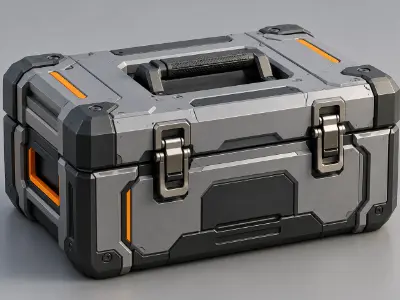
Create a complete hard-surface 3D model in Maya with clean topology, proper geometry control, and professional modeling techniques.
Create UV layouts for a 3D model and prepare the UV snapshot for texturing, including projection, alignment, orientation, and texture workflow.
Build a 3D character anatomy model in Maya by studying organic modeling principles, anatomy, hand structure, and character topology.
Create a 3D male character body using Autodesk Maya with appropriate anatomy, proportions, topology, and organic modeling techniques.
Create a 3D female character body using Maya, focusing on anatomy, proportions, organic topology, and detailed character modeling.
Model a detailed male character face in Maya using organic modeling techniques and appropriate facial topology.
Design and model 3D props for a character using Autodesk Maya and apply suitable modeling and topology techniques.
Create character hair geometry and prepare its UV mapping in Maya as part of a complete character production workflow.
Build a functional character rig in Maya using joints, controllers, parent-child relationships, constraints, and hand rigging techniques.
Prepare a character model and create body rigging using Maya's Advanced Skeleton tools for animation-ready character setup.
Create a facial rig using Maya Advanced Skeleton to prepare a character for facial animation and expression control.
Build a mechanical rig in Autodesk Maya using appropriate rigging and control techniques for mechanical animation.
Create a high-resolution digital sculpt in ZBrush using DynaMesh and sculpting brushes to develop detailed 3D forms.
Develop a detailed character sculpt and prepare optimized topology using ZRemesher and manual retopology techniques.
Create custom Insert Mesh assets in ZBrush for use in detailed digital sculpting and 3D modeling workflows.
Model a detailed Switch/GameCube controller in Blender using polygonal modeling, modifiers, beveling, and professional product-modeling techniques.
Create a detailed GoPro camera model in Blender using hard-surface modeling, modifiers, bevels, and product visualization techniques.
Build a natural environment in Blender using Geo Nodes, vegetation plugins, scattering, and environmental composition for product visualization.
Create and animate a coffee machine product visualization in Blender with product modeling, lighting, animation, and presentation techniques.
Create professional product lighting and light animation in Blender to enhance the visual quality and presentation of a 3D product.
Create fluid simulations in Blender using domain, flow, collider, effector, and simulation settings for realistic water effects.
Develop realistic smoke effects in Blender using simulation tools and integrate them into an animated 3D scene.
Create a crown splash water effect in Blender using fluid simulation techniques for high-quality visual effects.
Create a bouncing ball animation in Maya while applying core animation principles, timing, spacing, squash and stretch, and Graph Editor techniques.
Create a complete character walk cycle in Maya using animation principles, rig controls, timing, spacing, and the Graph Editor.
Develop a character run cycle in Maya with proper weight, timing, spacing, and animation principles using a rigged character.
Create a character action animation in Maya using rig controls, timing, posing, and animation principles to produce a dynamic movement sequence.
Create a cinematic environment in Unreal Engine 5 using landscape tools, Quixel Megascans, props, composition, and environment design techniques.
Build a realistic lighting setup in Unreal Engine using directional lights, sky lights, HDRI, volumetric fog, and atmospheric effects.
Import and integrate Substance Painter textures into Unreal Engine and create material instances with appropriate surface properties.
Create cinematic camera movements in Unreal Engine using CineCameraActor, keyframes, depth of field, focal length, and Sequencer.
Import Maya FBX character animations into Unreal Engine and integrate animated characters into a real-time cinematic workflow.
Produce a high-quality cinematic render using Unreal Engine's Movie Render Queue, lighting adjustments, render settings, and color grading.
Enhance an Unreal Engine cinematic with sound, music, and Niagara effects such as dust, fire, fog, and rain.
Assemble, edit, and export a complete cinematic project in Unreal Engine using environment design, animation, lighting, Sequencer, VFX, and rendering.
more practical projects across the course modules.
Free consultation & path planning
Enrol, orientation & kick-off
4 month, 51 classes begin
Theory, lab & AI workflows
27 client-grade builds
Viva, exam & course certificate
CV, interview & portfolio polish
Placement referral or freelance
Build a professional career across 3D animation, modeling, visualization, game assets, texturing, and character development through industry-focused practical skills.
"Lab support and mentor feedback were excellent. The portfolio I built here helped me get my first paid work."
"The Computer Networking with CCNA course was practical from day one. The mentors explained everything clearly and the projects helped me build real confidence."
"Lab support and mentor feedback were excellent. The portfolio I built here helped me get my first paid work."
"The Video Editing with Premiere Pro course was practical from day one. The mentors explained everything clearly and the projects helped me build real confidence."
"Lab support and mentor feedback were excellent. The portfolio I built here helped me get my first paid work."
"The 3D Modeling & Rendering with Blender course was practical from day one. The mentors explained everything clearly and the projects helped me build real confidence."
"Lab support and mentor feedback were excellent. The portfolio I built here helped me get my first paid work."
"The Digital Marketing Professional course was practical from day one. The mentors explained everything clearly and the projects helped me build real confidence."
To enroll at Creative IT Institute, choose your preferred course and enroll online or in person at your nearest campus. If needed, our counsellors can help you pick the course that suits you best.
Our counsellors will help you choose the right course based on your interests and career goals.
Our courses run online, offline and in a hybrid format that combines both, so students can learn in the way that suits them.
Yes, you get direct support and guidance from experienced mentors throughout the course.
Yes. Creative IT Institute is ISO 9001 certified and issues a course certificate after you complete your assessments and projects.
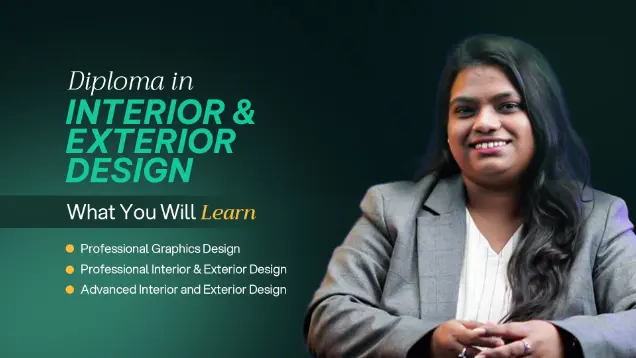
Master Interior and Exterior design through practical projects and industry-focused training.

Master 3D modeling, animation and visual storytelling through practical industry-focused training.
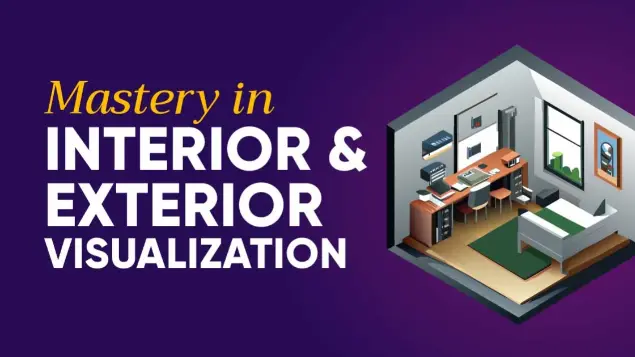
Master professional interior & exterior visualization
Share your details and our team will reserve your seat in an upcoming free class of Mastery in 3D Animation.
Fill in the form to reserve your seat in a free class.
Fill in the form and we'll send you access details.
Fill in the form to book your seat.
Fill in the form and an advisor will call you within one working day.